Saturday, February 6, 2021

Create PowerShell Multi-Menu Tool: Part I


Scenario

You want to create a PowerShell tool that allows users to select functions from a menu. Additionally, you want to have multiple menus.

Big picture - We create a folder structure that allows us to run a single script to launch or menus, update our modules, and set our global variables.

File Structure

To begin, I recommend setting up a file structure like the following:

Configs - Files that your scripts / modules look to in order to know what to do.
Logs - A place for you to put created log files
Modules - A place for your modules to go
Reports - A place for created reports
Third Party Tools - A place for tools that add functionality to your modules / scripts. For example, I put the SysInternals tools in this folder so that I can reference them in my scripts.

Thursday, September 5, 2019

Powershell Script Search For File on Remote Computers


Scenario

You want to check to see if a file exists on a bunch of remote computers...

Wednesday, September 4, 2019

HP Z600 913 Front 1394 Not Connected


Scenario

When you boot an HP Z600 Workstation the boot process stops and prompts you for an F1 Boot. The screens shows "913-Front 1394 Not Connected".

Tuesday, October 9, 2018

Log off inactive users


Scenario

You want to log off users who have been inactive for a specified period of time. By inactive, I mean the user has not used the mouse, keyboard, input device. I have tried a few ways of doing this, but this way was the most successful way for me.

What you need

CoreTech Shutdown Tool - Shutdown Tool
Hidden Powershell Script - Hidden Powershell Script
Exported Scheduled Task - XML File
Powershell Script

Friday, July 6, 2018

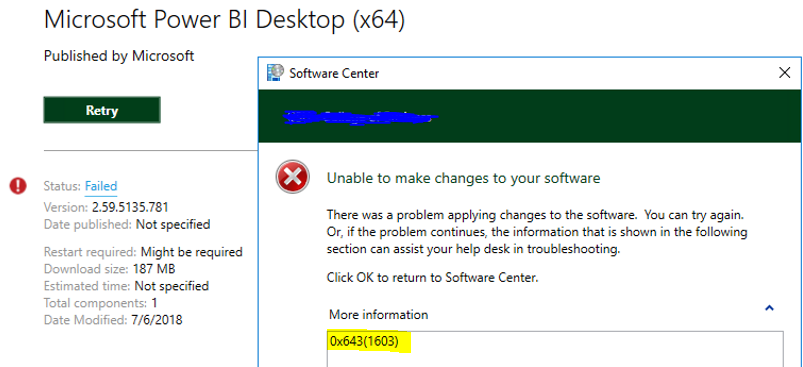
SCCM Error 0x643(1603) When Deploying Software


Scenario

You are deploying an SCCM application. The application installation fails resulting in an error code 0x643(1603)

Wednesday, April 4, 2018

Microsoft Support Diagnostic Packages


SCENARIO

You have a problem you are troubleshooting with a Windows server or desktop and you would like a tool to do an initial triage and data collection.

Thursday, March 8, 2018

SCCM 2012 Error 0x103(259) when deploying package


SCENARIO

You are deploying a package and you get an error 0x103(259). This error means that the installer you are calling exits withing 20 seconds with a code 259 and SCCM interprets it as a failure. In my case I was getting this error because I misspelled the name of a .bin file in my command line. But it may have something to do with your application as well.

You can run a script to deploy the package that monitors the status of the installation and exit properly: https://social.technet.microsoft.com/Forums/windows/en-US/fbccc114-3605-4363-b983-b2f7b02fe266/program-exit-code-259-in-sccm-cllient?forum=configmgrgeneral

DETAILS

I am including some of the details from the execmgr.log (client log) in case you want to look at what the log says when you run into the problem I had.

Monday, December 18, 2017

BugCheck when using Intel Advanced Networking Services


SCENARIO

You install the Intel Network Adapter Driver for Windows 10 (driver) and then you attempt to set a VLAN ID on your adapter. When you do this, your computer bugchecks. You get the following:

BAD_POOL_CALLER (c2)
The current thread is making a bad pool request.  Typically this is at a bad IRQL level or double freeing the same allocation, etc.
Arguments:
Arg1: 0000000000000007, Attempt to free pool which was already freed
Arg2: 0000000000000000, Pool tag value from the pool header
Arg3: 0000000000000000, Contents of the first 4 bytes of the pool header
Arg4: ffffbf0969a889ec, Address of the block of pool being deallocated

Monday, November 27, 2017

Windbg Useless Mex Rule "Issue 9912"

SCENARIO

If you are using Windbg to view a crash dump and you are using the mex extension, then you might recieved the following when running the known issue checker (!kic):

0: kd> !kic
[Rule 9912] Found issue from rule 9912!
[Rule 9912] Additional Data
[Rule 9912]  ---------------------
[Rule 9912] mex has no win32k export
[Rule 9912]
[Rule 9912]  ---------------------
[Rule 9912]
Stats:
Rules Ran: 92 Success: 76 Failed: 0 Skipped: 16
Number of Issues Found: 1
Total Number of Rules: 189
Scan Ended:  11/16/2017 10:52:50 AM (00:10:19.0159146)

Tuesday, November 7, 2017

Install and Configure Windbg


In this post, I'll show you how to get, install, and configure windbg so that you can debug and or review dump files.

What you will need:
1. Debugging Tools: click here
2. Mex Extension: click here
3. Microsoft Symbols Server Info: click here