Showing posts with label PowerShell. Show all posts

Saturday, February 6, 2021

Create PowerShell Multi-Menu Tool: Part I


Scenario

You want to create a PowerShell tool that allows users to select functions from a menu. Additionally, you want to have multiple menus.

Big picture - We create a folder structure that allows us to run a single script to launch or menus, update our modules, and set our global variables.

File Structure

To begin, I recommend setting up a file structure like the following:

Configs - Files that your scripts / modules look to in order to know what to do.
Logs - A place for you to put created log files
Modules - A place for your modules to go
Reports - A place for created reports
Third Party Tools - A place for tools that add functionality to your modules / scripts. For example, I put the SysInternals tools in this folder so that I can reference them in my scripts.

Thursday, September 5, 2019

Powershell Script Search For File on Remote Computers


Scenario

You want to check to see if a file exists on a bunch of remote computers...

Tuesday, October 9, 2018

Log off inactive users


Scenario

You want to log off users who have been inactive for a specified period of time. By inactive, I mean the user has not used the mouse, keyboard, input device. I have tried a few ways of doing this, but this way was the most successful way for me.

What you need

CoreTech Shutdown Tool - Shutdown Tool
Hidden Powershell Script - Hidden Powershell Script
Exported Scheduled Task - XML File
Powershell Script

Tuesday, October 31, 2017

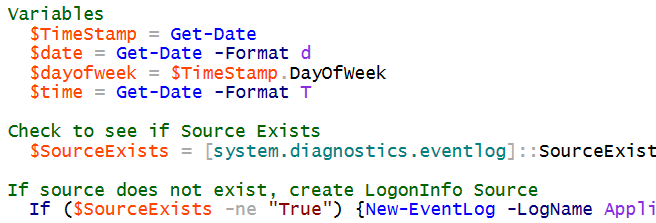
Create Logon Event in Event Log

SCENARIO

You don't like how the Windows Security Log records logon events. You want to create your own logon events and record information that you find useful.

Wednesday, April 5, 2017

Pull Specific events from event logs on multiple remote computers


SCENARIO

You want to get a specific event from multiple remote computers.  For example, you want to find 1074 events in the System log, but you want to pull those events from a bunch of computers.

Monday, February 13, 2017

PowerShell - Create Users, Databases, and Set Permission on MySQL

SCENARIO

You want to automate the creation of lots of MySQL user accounts, databases, and permissions set on those user accounts.  You can do this through PowerShell.

I modified a script by berniecamus: https://github.com/berniecamus/create-mysql-database/blob/master/createmysql.ps1

Create a csv file with the following headings:


Thursday, August 11, 2016

Powershell - Create List of Installed Software


Scenario

You want to find out what software is installed on the computers in your organization.  You can use PowerShell to do this.

First open PowerShell ISE and paste the following code in the script portion.

$list = Import-Csv "C:\TEMP\computers.csv"
foreach ($entry in $list)
{

try
    {
$machinename = $entry.pcname
$SrvPath = "\\server\share"
$Date = Get-Date -UFormat %m-%d-%y
$FileName = "$machinename" + "_" + "$Date" + ".csv"
Get-WmiObject Win32_Product -ComputerName $machinename | Select-Object PSComputerName,Name,Vendor,Version | Export-Csv C:\$FileName -NoTypeInformation

    }
    catch [Exception]
    {
    }
}

Friday, May 6, 2016

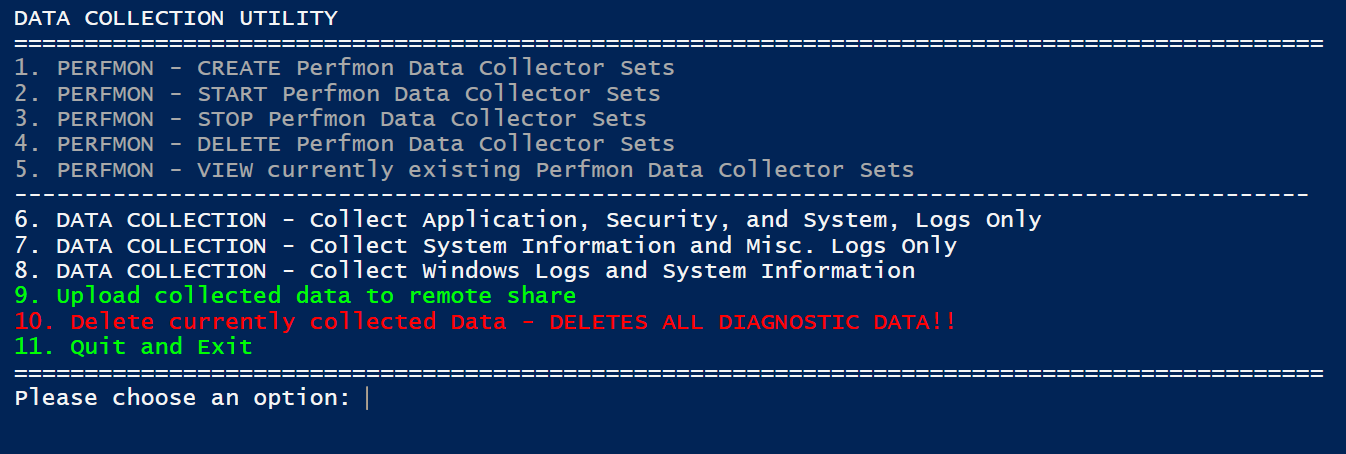
PowerShell Performance Diagnostics Utility


SCENARIO: You want to be able to create, start, stop, and delete Performance Monitor data collector sets and collect logs from your computer using a menu.  You can do all of these things manually, but this script will present you with a menu for performing these tasks.

NOTE: This will work in Windows 10.  If you are running on an older version of PowerShell, you will need to change Get-CimInstance cmdlet along with the Get-GPResultantSetOfPolicy cmdlet.

UPDATE: 11-06-2017 - I just pasted a newer version of this script below.

Click Here to Download Script: Data Collection Utility

Folder Structure:


Powershell Script: Copy files from multiple source directories


While you can create a package or application that copies config files out to your clients after an install, there may be times when it's easier to just use a PowerShell script to copy configuration files to your client machines.

This was true in our case where we had to copy files from different source directories depending on the name of the computer.  In our case, we had to copy a different configuration file to C:\Program Files (x86)\application\ depending on which site that computer was at.  Our computers have a four digit site identifier at the beginning so we leveraged this in order to do the file copy.

You can modify the script to accommodate your computer name scheme.

Wednesday, April 6, 2016

Create Perfmon on Remote Machines


Scenario: You want to start perfmon on several remote machines.  You have a list of machines, but you don't want to remotely create and start those perfmon data collector sets.

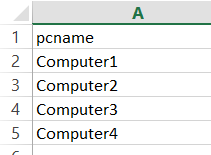
Here is a PowerShell script that you can use to start up perfmon data collector sets on a remote machine.  It pulls the list of computers from a .csv file called "computers.csv".  Your .csv should looks something like this: