Showing posts with label Script. Show all posts
Showing posts with label Script. Show all posts
Tuesday, October 31, 2017

Wednesday, April 5, 2017
Pull Specific events from event logs on multiple remote computers

SCENARIO
You want to get a specific event from multiple remote computers. For example, you want to find 1074 events in the System log, but you want to pull those events from a bunch of computers.Monday, February 13, 2017
PowerShell - Create Users, Databases, and Set Permission on MySQL
SCENARIO
You want to automate the creation of lots of MySQL user accounts, databases, and permissions set on those user accounts. You can do this through PowerShell.I modified a script by berniecamus: https://github.com/berniecamus/create-mysql-database/blob/master/createmysql.ps1
Create a csv file with the following headings:

Thursday, August 11, 2016
Powershell - Create List of Installed Software

Scenario
You want to find out what software is installed on the computers in your organization. You can use PowerShell to do this.First open PowerShell ISE and paste the following code in the script portion.
$list = Import-Csv "C:\TEMP\computers.csv"
foreach ($entry in $list)
{
try
{
$machinename = $entry.pcname
$SrvPath = "\\server\share"
$Date = Get-Date -UFormat %m-%d-%y
$FileName = "$machinename" + "_" + "$Date" + ".csv"
Get-WmiObject Win32_Product -ComputerName $machinename | Select-Object PSComputerName,Name,Vendor,Version | Export-Csv C:\$FileName -NoTypeInformation
}
catch [Exception]
{
}
}
foreach ($entry in $list)
{
try
{
$machinename = $entry.pcname
$SrvPath = "\\server\share"
$Date = Get-Date -UFormat %m-%d-%y
$FileName = "$machinename" + "_" + "$Date" + ".csv"
Get-WmiObject Win32_Product -ComputerName $machinename | Select-Object PSComputerName,Name,Vendor,Version | Export-Csv C:\$FileName -NoTypeInformation
}
catch [Exception]
{
}
}
Friday, May 6, 2016
PowerShell Performance Diagnostics Utility
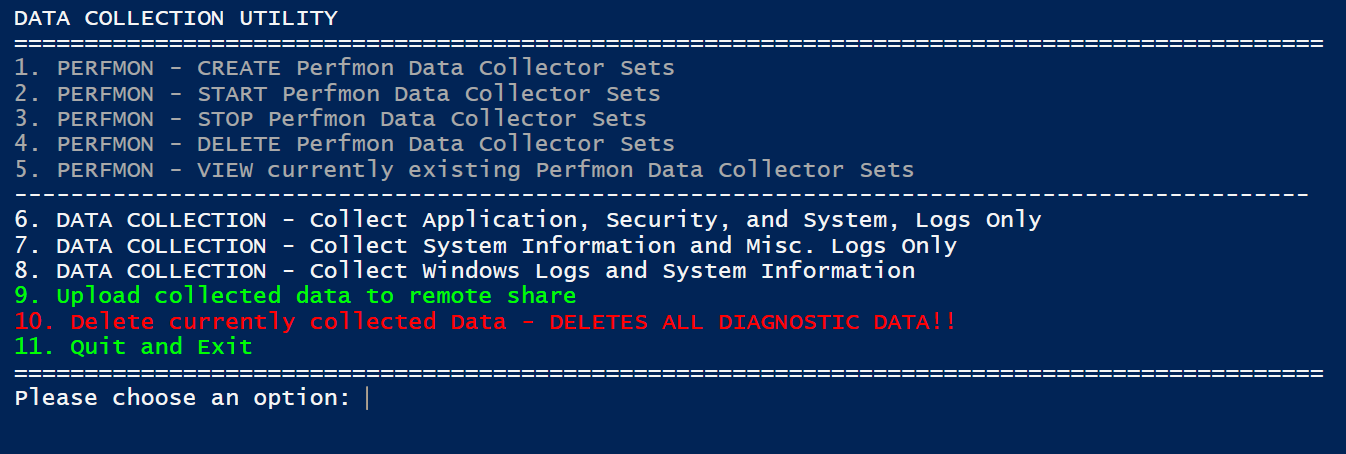
SCENARIO: You want to be able to create, start, stop, and delete Performance Monitor data collector sets and collect logs from your computer using a menu. You can do all of these things manually, but this script will present you with a menu for performing these tasks.
NOTE: This will work in Windows 10. If you are running on an older version of PowerShell, you will need to change Get-CimInstance cmdlet along with the Get-GPResultantSetOfPolicy cmdlet.
UPDATE: 11-06-2017 - I just pasted a newer version of this script below.
Click Here to Download Script: Data Collection Utility
Folder Structure:

Powershell Script: Copy files from multiple source directories

While you can create a package or application that copies config files out to
your clients after an install, there may be times when it's easier to just use
a PowerShell script to copy configuration files to your client machines.
This was true in our case where we had to copy files from different source
directories depending on the name of the computer. In our case, we had
to copy a different configuration file to C:\Program Files (x86)\application\
depending on which site that computer was at. Our computers have a four
digit site identifier at the beginning so we leveraged this in order to do the
file copy.
You can modify the script to accommodate your computer name scheme.
Subscribe to:
Posts (Atom)