Showing posts with label SCCM. Show all posts

Tuesday, August 16, 2022

SCCM Task Sequence Error 0x80004005


SCCM Task Sequence 0x80004005

ERROR: 

Task Sequence … has failed with the error code 0x80004005 in the task sequence step 'Upgrade Operating System'. For more information, contact your system administrator or helpdesk operator.

Tuesday, October 9, 2018

Log off inactive users


Scenario

You want to log off users who have been inactive for a specified period of time. By inactive, I mean the user has not used the mouse, keyboard, input device. I have tried a few ways of doing this, but this way was the most successful way for me.

What you need

CoreTech Shutdown Tool - Shutdown Tool
Hidden Powershell Script - Hidden Powershell Script
Exported Scheduled Task - XML File
Powershell Script

Friday, July 6, 2018

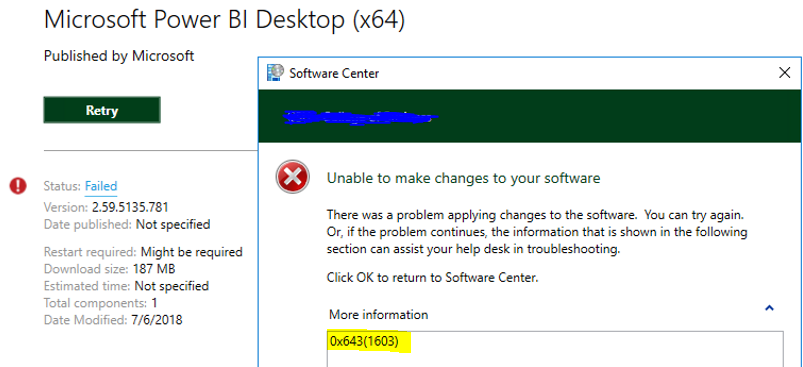
SCCM Error 0x643(1603) When Deploying Software


Scenario

You are deploying an SCCM application. The application installation fails resulting in an error code 0x643(1603)

Thursday, March 8, 2018

SCCM 2012 Error 0x103(259) when deploying package


SCENARIO

You are deploying a package and you get an error 0x103(259). This error means that the installer you are calling exits withing 20 seconds with a code 259 and SCCM interprets it as a failure. In my case I was getting this error because I misspelled the name of a .bin file in my command line. But it may have something to do with your application as well.

You can run a script to deploy the package that monitors the status of the installation and exit properly: https://social.technet.microsoft.com/Forums/windows/en-US/fbccc114-3605-4363-b983-b2f7b02fe266/program-exit-code-259-in-sccm-cllient?forum=configmgrgeneral

DETAILS

I am including some of the details from the execmgr.log (client log) in case you want to look at what the log says when you run into the problem I had.

Tuesday, May 16, 2017

SCCM Task Sequence Error 0x4005(16389)


Scenario

You are deploying Windows 10 x64 1607 update. After you click on the update in software center, it looks like everything is working. Files are getting downloaded and whatnot, but you eventually get the error above - Task Sequence: Upgrade to Windows 10 Enterprise x64 1607 has failed with the error code (0x80004005).

After you click "Close" on that, you look back in the software center and it eventually fails with an error code of 0x4005(16389).  It looks something like this:


Wednesday, May 18, 2016

Expand Values in SCCM Query Builder Values Box


Scenario

You are building or editing a query in SCCM 2012 R2. When you go to edit your query statement, you go to set your criterion properties and select a value.


Friday, May 6, 2016

Powershell Script: Copy files from multiple source directories


While you can create a package or application that copies config files out to your clients after an install, there may be times when it's easier to just use a PowerShell script to copy configuration files to your client machines.

This was true in our case where we had to copy files from different source directories depending on the name of the computer.  In our case, we had to copy a different configuration file to C:\Program Files (x86)\application\ depending on which site that computer was at.  Our computers have a four digit site identifier at the beginning so we leveraged this in order to do the file copy.

You can modify the script to accommodate your computer name scheme.